Gemini Lab Activity
 ...
...
Gemini Lab Activity
💡 Concept
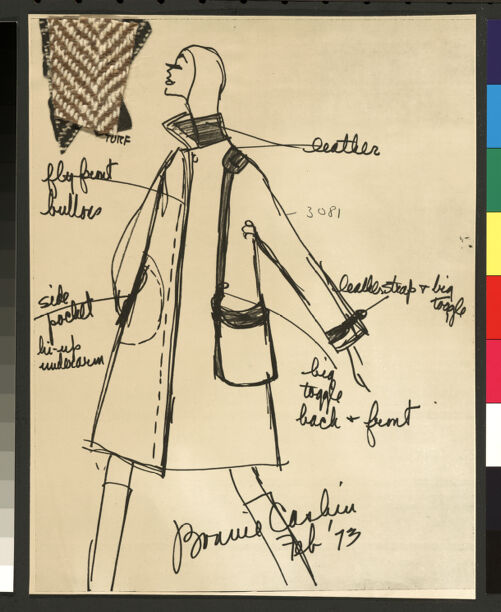 Prior to the mid-20th century, women's high fashion was often characterized by decorative fragility. Handbags were small, delicate objects meant to be carried delicately. Bonnie Cashin radically disrupted this. Recognizing the rise of the modern, independent career woman, she began designing for women who were commuting, traveling, and carrying their own weight—literally and metaphorically.
As fashion historian Stephanie Lake points out, Cashin was inspired by the convertible roofs of sports cars and the durable hardware of dog leashes. She introduced heavy-duty industrial elements into women's fashion, most notably the brass toggle or "turnlock" that became the signature of her work for Coach. By giving women oversized pockets and cross-body straps that freed their hands, Cashin's designs weren't just aesthetic choices; they were material interventions that facilitated physical and social mobility.
🖥️ Activity
In this lab, you will analyze how clothing and accessories dictate movement. You will use the Mirador viewer below to explore examples of Cashin's designs from the UCLA archive. Focus on the functional components of the garments and accessories. Then, you will copy the manifest of an item of your choice, paste it into the Cropping Tool, and extract a specific functional detail to share with the class.
👓 Examples
Use the embedded Mirador viewer below to view the items. Zoom in to look closely at the hardware, stitching, and utilitarian features.
🧱 Materials
You can view items on the Library Digital Collections site by clicking these links. The IIIF manifest URLs are below each item.
https://iiif.library.ucla.edu/ark%3A%2F21198%2Fzz00092rqf/manifest
https://iiif.library.ucla.edu/ark%3A%2F21198%2Fzz0009284w/manifest
🛠️ Tools
🪜 Steps
Cropping a IIIF image
- Copy the manifest URL of the item you would like to crop from the Materials section above and paste it into the Cropping Tool.
- Click the thumbnail in the left column to load in the IIIF Cropping Tool viewer.
- Zoom and view.
- To crop a detail from the image, click the white pencil icon, and highlight the desired rectangle by clicking and dragging a rectangle from corner to corner.
- A thumbnail of your selected detail will appear in a slider at the bottom of the Cropping Tool. You can repeat to collect multiple details.
- Click the Copy icon
 on the left side of the thumbnail.
Posting with an image
- Click Reply.
- To enter your image details, simply paste into the text field.
- Repeat for additional images.
✉️ Share
Once you have chosen your details of functional hardware or utilitarian design (e.g., a turnlock, a deep pocket, a heavy zipper), use the discussion post to share with your peers. Write a brief analysis (100-150 words) addressing the following: How does this specific physical detail imagine the body of the wearer? What kind of actions or spaces does this object invite the mid-century woman to inhabit?
Post by (DUE DATE)
🤝 Collaborate
You are encouraged to view, read, and respond to posts by your peers. Reply to at least one peer: How does the detail they cropped complement or complicate the story of the woman "on the go"?
Interact by (DUE DATE)