Memory Palace
 Students are introduced to the practice of "Ekphrasis" to practice "reading" an image/photograph.
Memory Palace
💡 Concept
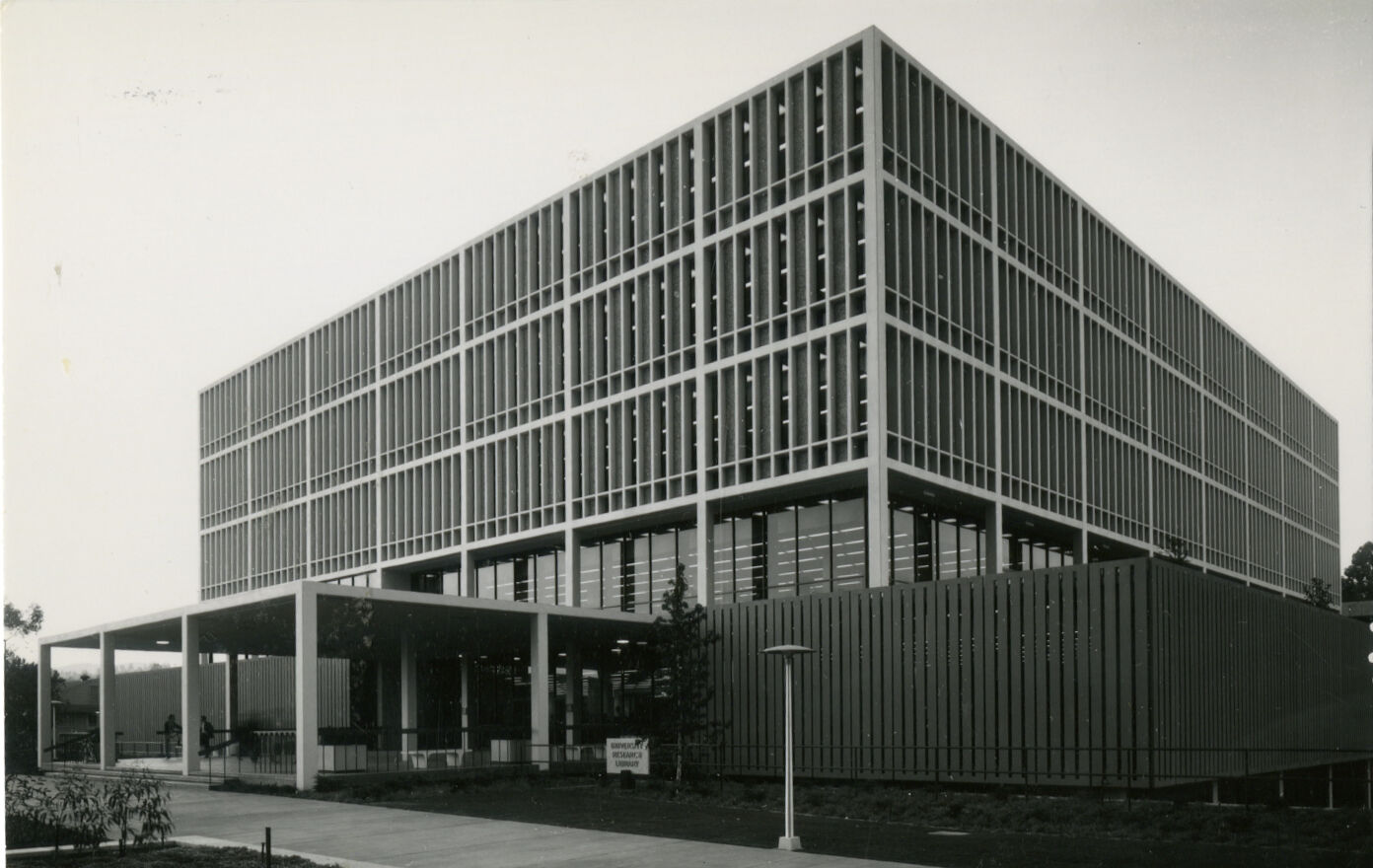
The University Research Library (URL), later renamed Charles E. Young Research Library (YRL), first opened in late 1964. It was designed by the modernist architect A. Quincy Jones in the "International Style," with rectangular lines of concrete and plate glass enclosing a 5-story box with two basement levels. The library received an addition in 1970, and was renovated in 2009 and 2011. At the time of its construction, the research library realized in physical form the most cutting edge ideas about information and its uses for research and scholarship. The layout of floors, and designation of various library functions in space, such as book storage in shelving stacks, card catalogs, reference services, study spaces, and special collections facilities, help us understand physical space and furnishings as a system of information.
🖥️ Activity
For this Lab Activity, we will enter into the space-time continuum of the Charles E. Young Research Library as a repository of collective memory. Using "mnemonic" techniques developed over several millennia for remembering and recalling facts, ideas, words, and images through spatial memory, we will take a guided tour through YRL, both digitally (via historical photographs from Library Digital Collections), and physically (through your own explorations on foot through the Library's various floors. Along the way, you will learn about digital collections: how they are accessed, browsed, and viewed
📍 Location
👓 View
A Brief Digression in Time
How Simonides of Keos brought down the house.

According to legend, the tradition of the memory palace (aka "theater of memory" or "mind palace") traces back to an Ancient Greek disaster with a little cameo on the part of the gods. The lyric poet Simonides of Ceos was doing a gig in Thessaly at a banquet thrown by a local strongman named Scopas. Apparently, Simonides had prattled on too long in tribute to the gods Castor and Pollux, and Scopas impatiently heckled him to get to the point (about himself), to the jeers of his kindred Scopadae and other diners.
Next thing we know, there's a knock, and Simonides is called to the door by two young men. He excuses himself, steps outside, and as soon as he does, a massive earthquake rocks Thessaly and the villa is leveled, crushing everyone inside. Only Simonides survives, and in the aftermath he is called upon by forensic investigators to name everyone who was in the room, and where they were sitting. Because he had perfect recall of spatial memory, Simonides was just the man for the job. In retrospect, classicists have concluded that the two young men were none other than Castor & Pollux, who manifested themselves in human form, and crashed the party to exact revenge upon the impertinent Scopadae and company.
So this one of those topics in Western Civilization where the deeper you dig, the more entangled facts get with mythology. If you're into such things, Frances Yates will tell you all about it in The Art of Memory (and if you're a little short on time, you can look at this Cambridge U. website instead). Yates is particularly taken with a guy named Robert Fludd, a kooky stage designer and contemporary of William Shakespeare who conjured up a whole cognitive enterprise on the foundations of theatre. Its gist: human spatial memory is indelible. To manage mental content, you tag it with visual symbols (such as a crown for a king), and attach those symbols in your mind's eye to specific locations in a building or other place you know well. You might think this is just a digression about history and the gods, but it's actually nothing more than a recipe for disaster. Let's try it!
DIY Memory Theatre
How to build your own memory theatre
- Close your eyes
- Imagine a building you know well
- Think of images/icons that represent a fact or concept you want to remember
- In your mind’s eye place those things somewhere in that building (a staircase, a hallway, etc.)
How to use your memory theatre
- Stand in front of an audience of 250 people or step outside a building until it collapses
- Take a “walk” through your imagined building and see the images: they will remind you of what you want to say
See "The Mind Palace" in action!
Benedict Cumberbach acts out in a very 21st-Century rendering of the ancient mnemonic "technology" in Sherlock
Library as Memory Palace
Information technologies and mnemonic techniques
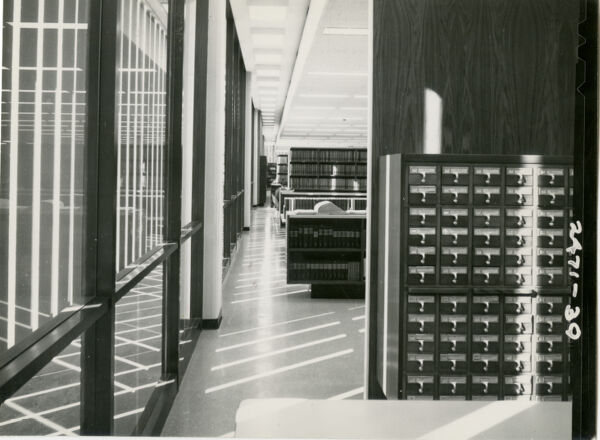 In its most obvious form, a research library is a building with books and other materials that is staffed by librarians who help patrons find information they need for various purposes. It also provides study spaces, instructional classrooms, lending technology, and workshops, even a cafe. Libraries also contain offices, processing facilities, and storage areas that are off-limits to patrons. Since the introduction of digital technologies, libraries have increasingly turned to online systems to make information available to patrons; over time, user access points have moved from computer terminals in the building, to remote access through devices owned by users, which does not require they be inside the building.
Because libraries evolve with changes in how information is collected, stored, and accessed, they also leave a trace through time of many different kinds of material, from 1000 year-old manuscripts to datasets from this year. Some of the physical infrastructure may be replaced, and some remain as originally constructed. And the patrons who use the library also represent a demographic cross-section of generations. Older visitors may browse and value book stacks, while newer users might prefer online resources and rarely step foot in the library, if only for studying and social gathering.
How people understand and use the library, in other words, depends largely upon the mental map of information they imprinted in their brains and bodies through spatial, visual, verbal, and experiential memory. In that sense, a library is not just a place in the physical and virtual world. It is also a place in human memory, subject to the complex, but also regular systems by which people organize, store and access information in their own heads.
Picturing UCLAs
What's the difference between a digital exhibit and a digital collection?
🛠️ Tools
IIIF Manifest
The IIIF manifest can look scary, but it holds the key to a world of high quality content
IIIF is officially pronounced "triple-eye-eff." The global community of librarians, archivists, museum curators, technologists, and educators who envisioned the International Image Interoperability Framework bypassed emoji (👁👁👁f) and conjured up a logo  with awesome powers. A manifest is an online file or list of information about a digital object, such as metadata (title, artist, holding institution, etc) and links to images, videos, audio files, or even 3d renderings. To use it, all you need is the URL, which is typically linked from the logo. You copy and paste it into various IIIF-compatible tools to load items for use.
Here is an example of a manifest URL. Go ahead and click it just to see what a manifest looks like!
https://iiif.library.ucla.edu/ark%3A%2F21198%2Fz1897g72/manifest
And this is the collection manifest for the UCLA Archives, with thousands of items:
https://iiif.library.ucla.edu/collections/ark%3A%2F21198%2Fz1zw7vz3
Mirador
This widely-used IIIF viewer is designed for comparative viewing of multiple items. Copy and paste the item manifest or the collection manifest URL above to try it out.
IIIF Cropping Tool
Use this handy device to browse, crop, and share IIIF imagery
The Mind's Eye
A special demo tool shows how to manipulate iiif images using the URL.
We're going to play with a IIIF image URI and see what it presents to us, depending upon modifications we make to its sequenced characters.
https://iiif.wellcomecollection.org/image/L0061088/1352,3655,478,296/,600/0/bitonal.jpg
URL Tool
Here's how it works
Read the following steps through, and then proceed one at a time through the activity. (click to open and close)
- First, see an image delivered using the URI in the grey box in Materials above, by pasting it into the IIIF Image URL tool. Look closely at it: how might 👁 in relation with the content in that page?
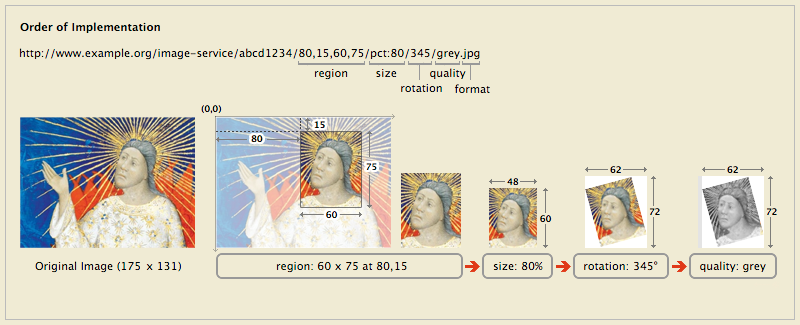
- Then look at the diagram below, which includes a simplified URI, and illustrates what various parts of it can be specified to return just the part, size, and quality of an image you want.
- Following the example shown, try making selective changes to the URI you pasted in the viewing tool above, for example:
- for region, try different numbers between the commas, such as changing the first two for location, e.g. /5000,1000, 275,165/
- for size, try different percentages, e.g. /pct:25/, and then try different pixel sizes large and small for width and/or height, e.g. /200,200/ or /700,/ or /,700/
- for rotation, note that some servers, like this one, will only deliver in quarter turns, such as /0/ or /90/ or /180/ or /270/
- for quality, try: /default.jpg, /grey.jpg or /color.jpg or /bitonal.jpg
- Then take a look at the full image, by replacing pixel values or percentages with /full/full/ for region and size.
- Zoom around and look at the image to see what you recognize. Look closely at the characters and symbols: what do you notice about their configuration, distribution, similarities and differences.
- After you are done, take a step back to look again at the HTML code in the grey box. Does any of it look more intelligible now that you've learned about IIIF Image URIs?
Global IIIF Supply
Libraries, museums, and other institutions around the world make their content available and interoperable via IIIF.
Some institutions display the logo prominently within their collection websites. Here are a few examples:
- Bodlean Libraries, University of Oxford
- UCLA Library
- Harvard Library
- Harvard Art Museums
- Princeton Art Museum
- Vatican City Digital Library
- University of Wisconsin, Milwaukee
Other institutions might not provide the logo, but instead links to 'IIIF Manifest' or 'View in Mirador' or 'Open in Viewer'. See:
- Princeton University's Digital PUL
- Brown University Digital Respository
- Amherst College Digital Collections
Below is a map of more institutions with IIIF-enabled collections.
🧱 Materials
🪜 Steps
Posting with an image
To add linked images to a discussion post (click to open and close)
- click Reply
- to enter your image details, click the
 picture icon in the text editing toolbar. In the Upload Image popup, click the URL tab, and paste your URL in the File URL blank. Briefly describe your image in the Alt Text field (for the visually impaired), and click Post Reply .
 - repeat for additional images
✉️ Share
Part 1: compose a "memory palace" imaginary sequence of image details from historic archival photographs from 1964
Choose and crop details from any images from the Memory Palace teaching collection in the Materials section above, and compose a sequence of detail views: a "tour" or mini narrative, like a comic. Use framing, close-up/distance (zoom), and juxtaposition creatively to make your sequence dynamic. Then add a short comment to explain.
Detailed instructions
- Browse the collection in the Materials section above
- Choose items that you would like to focus on, considering library functions, services, and usage, and open them in the Mirador viewer
- Zoom and look carefully for important or interesting details,
- Then open your selected items in the Cropping Tool and crop 6-9 details of that image to share with others
- Copy and paste those 6-9 details in the reply and arrange them next to each other in sequence as a visual narrative.
- Write a brief (approx. 40-60 words) comment describing the image details you shared, and what they tell you about the library, its history, and function.
Post by [date]
🤝 Collaborate
Part 2: take a walking tour of YRL and photograph 1 location to share
Explore YRL, taking note of spaces you have not seen before, and looking more closely at areas you might have become too habituated in seeing to notice. See if you can locate spaces represented in your narrative sequence from Part 1. Then pick and photograph one place of special interest to "tag" with a symbol to share with others.
Detailed instructions
- Walk through all accessible floors and areas of YRL
- Look carefully to see what materials and services are available and where they are located
- Take a photograph of a location where you would place an imaginary symbol in your mind's eye as part of our collective memory palace
- Share your photograph in a second discussion post, and feel free to manipulate the image to add a symbol on top of the image
- Write a brief (approx. 30-40 words) comment describing the location and the symbol you attached to it.
Interact by [date]