Annotation
 ...
...
Annotation
💡 Concept

The W3C (World Wide Web Consortium) writes standards for content on the web. It defines annotation as a relational structure that assigns a "body" (often a brief text comment) to a "target" (typically a highlighted passage of text, or outlined portion of an image). An annotation can be created by an original author of a work, for example, or by a reader who makes a mark in a copy of the work they own (or checked out of the library!)
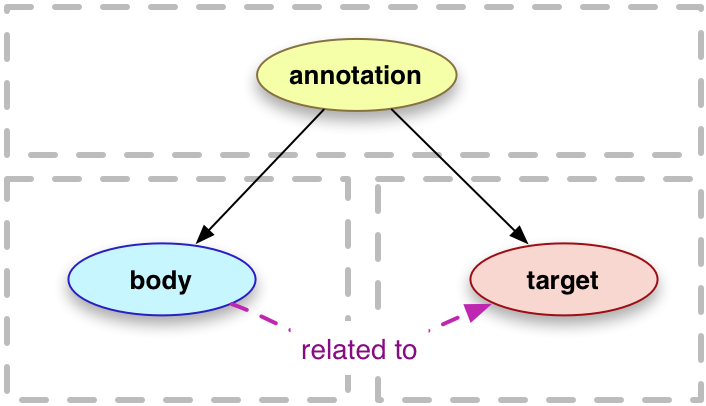 An annotation, in other words, is a comment and/or other piece of information that is attached by an author or reader to a portion of a target object, such as a line of text in a document, a detail in an image, or a clip of video. Most annotations are short text, but they can also be, or include, media, such as an image. It is different from metadata, which is information about the item, such as who made it, when, and where.
As a concept model, the W3C definition of annotation bears striking resemblance to the pictographic language of the Nahua, suggesting that there is more at play in the practice and history of annotation than simply scribbles in the margins of books. It is an idea that connects. Indeed, annotation offers a way for communities to engage in a secondary act of creation with authors and artists.
In art history, spatial annotation of an image is an important method of inquiry related to scholarly practices of close looking and detail analysis. Across academic disciplines, the practice of annotating is analytical, or inductive, an incremental step between exhibition and thesis or argument. It makes your media work for you as evidence, rather than illustration (or decoration) to embellish text.
Activity
Components of an Annotation
For our final Scalar project, we will focus on a particular construct for annotation that can be used in many different situations. It has three elements:
- A title (in Scalar the title is linked to the annotation as a page)
- A description or observation (parts 2 and 3 here comprise the "Content" field in the Scalar annotation tool)
- An interpretive statement
Example: "Simple collar. In the painting, the father's collar is mid-sized, white, and has just a bit of lace frill around the edges. It appears to express simple values or Puritanism."
Standard of Plausibility
Annotations express the perspective of the person annotating, but they aren't completely arbitrary. We will apply a basic standard of plausibility, which asks that each contributor consider: originality (the degree to which the annotation expresses an individual, or unique perspective or insight), and possibility (how likely the interpretation is to be valid, from another person's point of view). In the rubric below if either category is a 0, you might want to redo. Any other score is fine.
| VALUE | ORIGINALITY | POSSIBILITY |
| 2 |
I wouldn't have thought of that on my own |
I agree |
| 1 |
I thought of that, too |
I'm not sure I agree, but I can see how someone might |
|
0 |
It's too obvious to even say | I doubt anyone would agree |
🫵 Practice
In this Lab Activity we will practice making "social" annotations, that is one annotation per student on the same image in our practice Scalar project.
👓 Example
Target image on the DFC Site
Access the DFC embedded here or at the link below for quick access to image and text content and search.
🧱 Materials
Go to: Chapbook: A Scalar Training Project
🪜 Steps
- Consult the Digital Florentine Codex site (embedded in the Examples section) for context about this image.
- Choose any detail you would like to comment on, and add an annotation in the Scalar "Chapbook" project, following the directions in the Scalar User's Guide (below)
- Submit a post with a link to your individual annotation (hint: just copy your own blue annotation title and paste it in)