The I's Have It
 ...
...
The I’s Have It
💡 Concept
💡 Concept
At first reading, one could assume that I is for interoperability. Or it's for international. Or it could be for image. In fact, none of these is completely true. The very 21st-Century techno-jargonistic acronym or abbreviation of first initials, is officially pronounced "triple-eye-eff." It would perhaps be better written 👁👁👁f, that is, as a monstrous letter f with three peepers. The global community of librarians, archivists, museum curators, technologists, and educators who dreamed up the International Image Interoperability Framework conjured an acronymic logo  that does, in fact, have awesome powers because it is also an icon. So what can you see with IIIF, and what is the relationship between icons and what you say when you are "reading" them?
🖥️ Activity
For our second Digitl Lab Activity, we will explore some of the hidden powers in an image that uses the IIIF URI API. This anachronistic acronym alphabet soup bears spelling out:
- IIIF is the International Image Interoperability Framework: we're going to learn about it first-hand.
- URI (
 = 👁 ) stands for Uniform Resource Identifier: it is a unique string of characters assigned to a particular resource (such as a digitl image); in most cases you've probably run across in life these days, a URI is the same as a URL (Uniform Resource Locator). A URL gets something for you, whereas a URI identifies it. In the IIIF universe, the term URI is preferred, but we will use it like an everyday URL, that is, the string of characters you see in your browser bar.
 - API is short for Application Programming Interface. It is a set of rules that computer programmers share to help their respective programs play nice with each other. Here it regularizes image URIs so we can maniipulate them with predictable results.
We're going to play with a IIIF image URI and see what it presents to us, depending upon modifications we make to its sequenced characters.
🧱 Materials
https://media.getty.edu/iiif/image/d5524600-64ba-4b21-b7fd-b20f2f79b00c/1355,4970,80,70/,600/0/bitonal.jpg
🛠️ Tools
🪜 Steps
IIIF Image URI API manipulation activity
Read the following steps through, and then proceed one at a time through the activity. (click to open and close)
- First, see an image delivered using the URI in the grey box in Materials above, by pasting it into the IIIF Image URL tool. Look closely at it: how might the 👁 in the image relate to the 👁conic expressions we've been discussing?
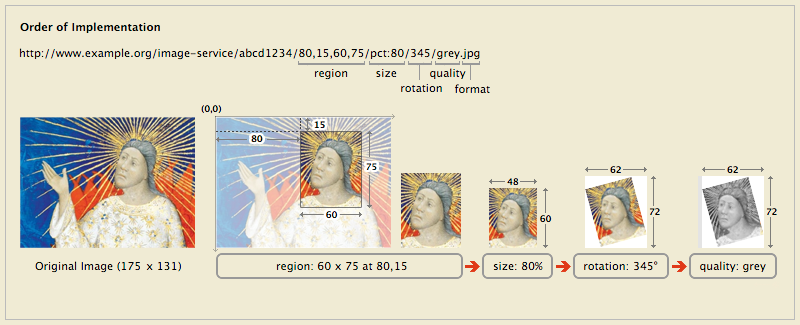
- Then look at the diagram below, which includes a simplified URI, and illustrates what various parts of it can be specified to return just the part, size, and quality of an image you want.
- Following the example shown, try making selective changes to the URI you pasted in the viewing tool above, for example:
- for region, try different numbers between the commas
- for size, try different percentages, e.g. /pct:25/, and then try different pixel sizes large and small for width and/or height, e.g. /200,200/ or /700,/ or /,700/
- for rotation, note that some servers, like this one, will only deliver in quarter turns, such as /0/ or /90/ or /180/ or /270/
- for quality, try: /grey.jpg or /color.jpg or /bitonal.jpg
- Then take a look at the full image, by replacing pixel values or percentages with /full/full/ for region and size.
- Zoom around and look at the image to see what you recognize. Look closely at the characters and symbols: what do you notice about their configuration, distribution, similarities and differences.
- After you are done, take a step back to the previous Lab Activity and look again at the HTML code in the grey box. Does any of it look more intelligible now that you've learned about IIIF Image URIs?
- To wrap up, using the URI tool, create an image you would like to share with the class in this Lab Activity, and post it with a brief reflective comment below.
Posting with an image
To add linked images to a discussion post (click to open and close)
- click Reply
- to enter your image details, click the
 picture icon in the text editing toolbar. In the Upload Image popup, click the URL tab, and paste your URL in the File URL blank. Briefly describe your image in the Alt Text field (for the visually impaired), and click Post Reply .
 - repeat for additional images
✉️ Share
Post an image detail you modified, or leave a comment about IIIF image manipulation as an experience and a set of possibilities
🤝 Collaborate
Look through the posts by other participants, and leave a comment if you are so inspired