An Introduction to IIIF
The International Image Interoperability Framework (IIIF) defines a set of open standards for describing and delivering high-quality images over the web. The standards are the result of collaborative efforts across universities, museums, libraries, and other cultural heritage institutions around the world and provide a standard practice for making images (and other media) available. IIIF is not software, it is a protocol, a lingua-franca, for sharing images, collections, and metadata.
IIIF-enabled media is delivered via manifests. A manifests is a list. On ships, a manifest would have an entry for every passenger, crew member, and officer, as well as a detailed inventory of all cargo and livestock brought aboard and unloaded. To similarly account for global transport of digitized library and museum collections online, the IIIF movers and shakers relied upon the age's-old technique: just make a list and sort it out at the other end. A IIIF manifest is an aggregated string of media links and descriptive metadata (basic information about the media) that a source institution wants to make available to users at the end of a media item's journey from its home page.
IIIF manifests are heavily dependent upon URIs. You may have heard of a URL (Uniform Resource Locator). A URL is the same as a web address. It is the address you put in the browser search bar to go to a website. URI is slightly (but only slightly) different. URI stands for Uniform Resource Identifier: it is a unique identifier, in the form of an address, assigned to a particular resource (such as a digital image) on the web. A URL gets something for you, whereas a URI identifies it. Most often a URI can be used in the same way you might use a URL. So, following a URI that you find in one of the manifests mentioned above might lead you to another manifest or to a digital image.
In the IIIF world, there are two types of manifests: an image manifest and a presentation manifest. As you might guess, an image manifest contains information about an image, such as width and height. But IIIF is oriented toward the delivery of large, high-quality images, images that the end user can zoom in on and see close details. For this reason, an image manifest might also contain information about the various zoom levels afforded by the image. The presentation manifest is responsible for containing information about real-world objects. A presentation manifest might contain a list of metadata about an object, links to images of the object, or descriptive annotations about the object. A presentation manifest might also simply be a list of objects that for a collection.
To be honest, you will most likely never need to look at what is contained within a manifest. Manifests are written in a "machine-readable" format that can be a little intimidating. Much more important is being able to make use of these various manifests to work with digital images.
The Image Manifest
Here is an example of an image manifest:
https://collections.library.yale.edu/iiif/2/32338667/info.json
If you followed that link, you might have seen a page that looked like code. In fact, it is encoded, using the standards of IIIF, to transmit information about a specific image. What is really interesting for us, however, is the URL.
Do you see at the part at the end of the URL that says info.json? That info.json part is telling the image repository to send us information about the image. We can change this part to tell the repository to send us the actualy image. Notice the difference in the following url and follow the link:
https://collections.library.yale.edu/iiif/2/32338667/full/full/0/default.jpg
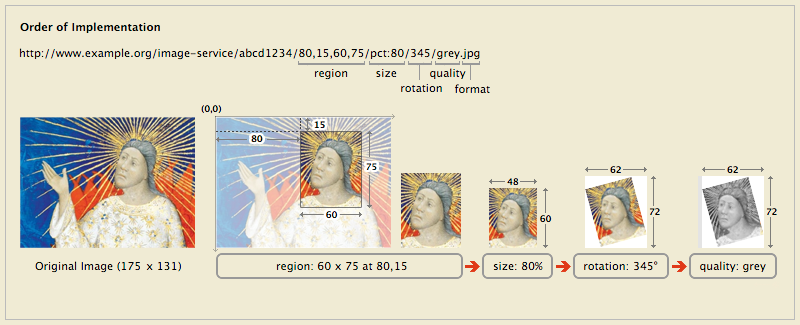
The difference in the second link is that we have replaced info.json with full/full/0/default.jpg. This last part of the URL is really important. Each of the four parts, separated by slashes, let you control different aspects of how the image is displayed: region, size, rotation, quality, and format. The tool below allows you to inspect a IIIF image URL and make changes in real time. Copy and past the URL above (the one ending in default.jpg) and paste it into the box below. You'll see the image is much too large for this webpage. We said that the four parts of the URL correspond to region, size, rotation, quality, and format. So, we can alter the second part to control the size of the image. Changing the second "full" to "pct:20", for example, we get:
https://collections.library.yale.edu/iiif/2/32338667/full/pct:20/0/default.jpg
Try making this change in the tool below.
The "pct:20" part indicates that we would like image to be 20% of its full size. You can also specify the exact width (in pixels) that you would like you image to be. Changing pct:20 to "500,500" would give you an image that is stretched to 500 pixels wide and 500 pixels high. Not terribly useful, perhaps. Try removing the height, leaving you:
https://collections.library.yale.edu/iiif/2/32338667/full/500,/0/default.jpg
By leaving the height empty the URL is simply saying, "set the height to whatever is appropriate for the width".
Now try changing the third part, the currently set to 0. This part represents degrees of rotation. You can set this to be anything from 0 to 359.
The first part of the URL is perhaps the most powerful and useful. This part allows you to specify a region of the image that you would like to extract:
https://collections.library.yale.edu/iiif/2/32338667/3000,1800,1000,1400/full/0/default.jpg
This link says, "Crop the image to a region that starts at coordinates 3000, 1800 and is 1000 pixels wide and 1400 pixels high". Normally you would never type these in manually, you would use a tool designed for this purpose. But it is interesting to try it out.
The graphic below explains the four parts of the IIIF Image URL: