Finding Manifests
Every digital object (book, painting, drawing, sculpture...) that is available in IIIF has a manifest URL. The manifest URL is the key to using these objects in the various IIIF tools. You need to select and copy the URL to start working with the images and metadata.
IIIF is used by a growing number of institutions, but is not yet used everywhere, so the object of your choice might not yet have a manifest URL.
 One easy way to know that an object is IIIF-enabled is to look for the IIIF icon on an item's detail page. As an example, visit the following item page on UCLA's digital collection website:
https://digital.library.ucla.edu/catalog/ark:/21198/zz002b5w64
Scroll down the page until you see the IIIF logo on the right. Clicking on the logo will open the manifest.
The next example, from the Princeton University Art Museum, also displays the IIIF logo. Notice however, that in this instance, clicking on the logo results in opening the work in a viewer. To get the manifest URL in this viewer (called the Mirador Viewer), click the hamburger icon in the upper left (the three horizontal lines) and then scroll to the bottom of the metadata where you will find a link to the manifest.
https://artmuseum.princeton.edu/collections/objects/27933
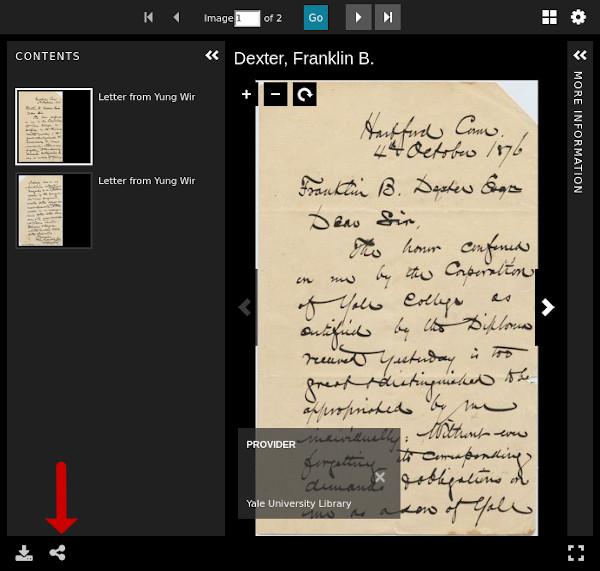 The viewer shown to the right is called Universal Viewer and is used at many institution websites. The IIIF /link/logo might be displayed in the bottom left-hand corner of the viewer, or you may have to click the Share icon to access the link to the IIIF manifest. This is the case with Yale Digital Collections.
Copy the URL
- Select and copy the URL. This is the key you need to work with this object.
- Sometimes it will also be possible to drag and drop the IIIF logo next to the URL.
- If you click on the URL, the manifest will open in your web browser. You will see a page filled with json code. Don't panic! You don't need the code, only the URL.
Unfortunately, each institution presents their IIIF manifest links in slightly different way, so you may have to hunt and peck.
Activity: Finding manifests
See if you can find the manifest URL in the following repositories.
Specific institutions: Look for the words 'IIIF manifest URL' or the IIIF logo in the metadata (descriptions) of an item in the institution's online catalogue. Some examples, all starting from an item's individual record (catalogue description):
- UCLA Library Digital Collections > On a single object page, a link to the manifest appears with the IIIF icon just below the zooming viewer.
- Ghent University Library > go to ‘For developers’
- KU Leuven > go to ‘View online’ > open the manuscript in Teneo > go to ‘information’ (‘Permalink IIIF manifest’)
- Gallica BnF > click on the IIIF logo in the left sidebar > click on the information 'i' logo in the right upper corner to open the metadata for the object > the manifest is at the bottom of the metadata
- Cambridge University Digital Library Many options, among others the obvious 'Manifest URL' button.
- Getty Museum > Filter on 'open content images' > search for object > manifest is at the bottom of the record, under 'APIs & other identifiers'
- Musea Brugge > manifest is at the bottom of the record, under 'Linked Open Data'
- Library of Congress > 'manifest' is listed at the bottom of the record > open the manifest > copy the URL
- Biblissima IIIF Collections: This website tries to gather all of the available manifests of manuscripts and rare books in the world (but is not exhaustive yet). Some 100.000 IIIF compliant manuscripts and rare books! Includes giant collections like Gallica (BnF) and e-codices.
- Fragmentarium: Circa 5400 IIIF compliant medieval manuscript fragments.
- Internet Archive: Millions of texts, images, audio and video available in IIIF. The manifests URLs are not published but can be reconstructed quite easily by inserting an item's identifier into a URL structure (see this 3-step guide).
- FranceArchives: National aggregator for French archives. IIIF already implemented for these collections, and growing.
- Wikidata: Contains manifest URLs for thousands of objects (but not consistently). You can search directly in Wikidata, or search for the item you are interested in on Wikipedia > click on 'wikidata item' > the manifest URL is listed under 'statements' (e.g. The Kiss by Gustave Klimt).